
You finished your manuscript. You polished every sentence. Now you want to turn that draft into a downloadable ebook that readers can buy with one click.
The journey from draft to download follows a clear path. Amazon Kindle Direct Publishing makes it possible for anyone to become a published author. No agent required. No publisher needed. Just you, your manuscript, and a few simple steps.
Let me walk you through exactly how amazon kindle direct publishing transforms your draft into a live ebook.
Keach Publishing guides authors through ebook publishing on Amazon with confidence.
Start your journeyWhat Is Amazon Kindle Direct Publishing for Ebooks?
Amazon kindle direct publishing represents Amazon’s self-publishing platform for ebooks, paperbacks, and hardcovers. Authors upload their manuscripts directly, and Amazon converts them into Kindle format. Readers can then buy and download the book instantly.
The platform launched in 2007 and transformed the publishing industry. Before KDP, self-publishing carried a stigma. Authors paid vanity presses enormous fees, and distribution remained extremely limited. Today, KDP empowers anyone with a manuscript to reach millions of readers.
Ebook publishing through KDP offers several advantages. You retain all rights to your work, set your own price, and earn up to 70 percent royalties on each sale. Traditional publishing offers none of these freedoms.
The platform handles everything technical, including file conversion, global distribution, download delivery, and royalty payments. You focus on writing and marketing while Amazon handles the rest.
How Do You Prepare Your Draft for Ebook Publishing?
How to sell ebooks on amazon starts with professional preparation. Your manuscript needs editing before you upload anything. Professional editing catches errors you will miss. A good editor transforms good writing into great writing.
Professional cover design comes next. Your cover makes the first impression on potential readers. A DIY cover screams amateur, while a professional cover signals quality and builds trust. This investment pays for itself through higher click through rates.
Professional formatting prepares your manuscript for KDP’s requirements. Clean formatting ensures your book looks professional on every device. No weird spacing. No broken chapter headings. Just a smooth reading experience.
KDP accepts several file formats. EPUB files work well. DOCX files also upload successfully. Avoid MOBI files, as Amazon no longer supports them for new ebook uploads.
If you have been following our series on Amazon publishing, our previous post on From Idea to Ebook covers the complete journey from concept to publication. This guide focuses specifically on ebook publishing and selling.
Preparing your draft for ebook
Preparing your draft for ebook publishing takes expertise. We make it easier. Keach Publishing provides complete ebook publishing services including editing, design, and formatting. We help you create a professional ebook that stands out on Amazon. Get publishing help
What Ebook Publishing Services Do You Need?
Ebook publishing services range from basic to comprehensive. At minimum, you need professional editing, cover design, and formatting. These three services determine your book’s quality and sales potential.
Professional editing comes first. Developmental editors examine your story structure. Copy editors catch grammar and consistency issues. Proofreaders provide final polish. Each layer catches different errors.
Professional cover designers create genre appropriate artwork. They understand Amazon’s thumbnail requirements and know which colors, fonts, and images attract clicks. A great cover stops the scroll and invites investigation.
Professional formatters prepare your interior files for KDP’s specifications. They handle margins, chapter headings, and embedded fonts while ensuring your book looks professional on Kindles, phones, and tablets.
Some authors use aggregators like Draft2Digital for ebook distribution. These services upload your book to multiple retailers simultaneously. Apple Books, Kobo, and Barnes & Noble all receive your ebook through one submission.
How Do You Upload Your Ebook to KDP?
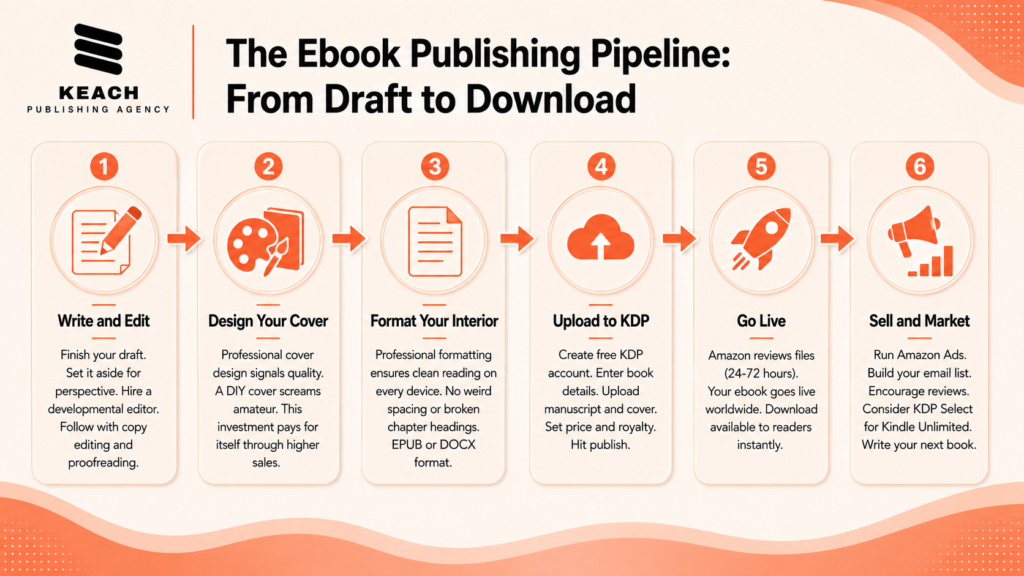
Creating your KDP account takes about fifteen minutes. Go to kdp.amazon.com, sign in with your Amazon account, and provide your tax and banking information. Amazon needs these details to pay you.
Upload your manuscript file next. KDP accepts EPUB and DOCX files. Upload your cover image separately, and the platform converts your files into Kindle format automatically.
Enter your book details carefully. Your title and subtitle affect search visibility. Your categories determine where your book appears. Your keywords help readers discover your work. Your description converts browsers into buyers.
Set your price and royalty option. The 70 percent royalty works for most authors who price between $2.99 and $9.99. Select your territories, then hit publish. Amazon reviews your files for 24 to 72 hours. Once approved, your ebook goes live worldwide.
Keach Publishing offers complete ebook publishing services from editing to upload.
Prepare my ebookHow Do You Sell Ebooks on Amazon After Publishing?
How to sell ebooks on amazon continues long after your upload completes. Set up your Author Central account. Add your bio, photo, and social media links. Claim all your books under one professional author page.
Run Amazon Ads to generate visibility. Start small with automatic targeting campaigns. Review your search term report after a few weeks and move winning keywords to manual campaigns.
Encourage reviews from every reader. Add a request at the end of your book and follow up with email reminders. Reviews build the social proof that convinces other shoppers to buy.
Consider enrolling in KDP Select. This program makes your ebook exclusive to Amazon. In exchange, you gain access to Kindle Unlimited page reads and promotional tools like Countdown Deals.
Keach Publishing provides complete ebook publishing services and ongoing support.
Book a consultationWrap Up
The journey from draft to download follows a clear path. Write and edit your manuscript. Design a professional cover. Format your interior. Upload to KDP. Then market your ebook consistently. Each step builds on the last.
Amazon Kindle Direct Publishing puts the power in your hands. No gatekeepers. No rejection letters. Just you, your manuscript, and millions of potential readers.
At Keach Publishing, we help authors navigate every stage of ebook publishing. From manuscript development to KDP setup to ongoing marketing, we handle the technical complexities so you can focus on writing. Your draft deserves to become a downloadable ebook. Let us help you make it happen.