

You publish your book. You check your KDP dashboard. You see sales numbers. But something feels incomplete. Where do those sales come from? Which keywords drive purchases? How do your books compare to similar titles? KDP shows you exactly that. Author Central shows you the why. Let’s break down the data hidden inside Amazon Author Central.
Keach Publishing helps authors decode Amazon Author Central sales data.
Decode the Sales NOW!What Sales Data Does Amazon Author Central Provide?
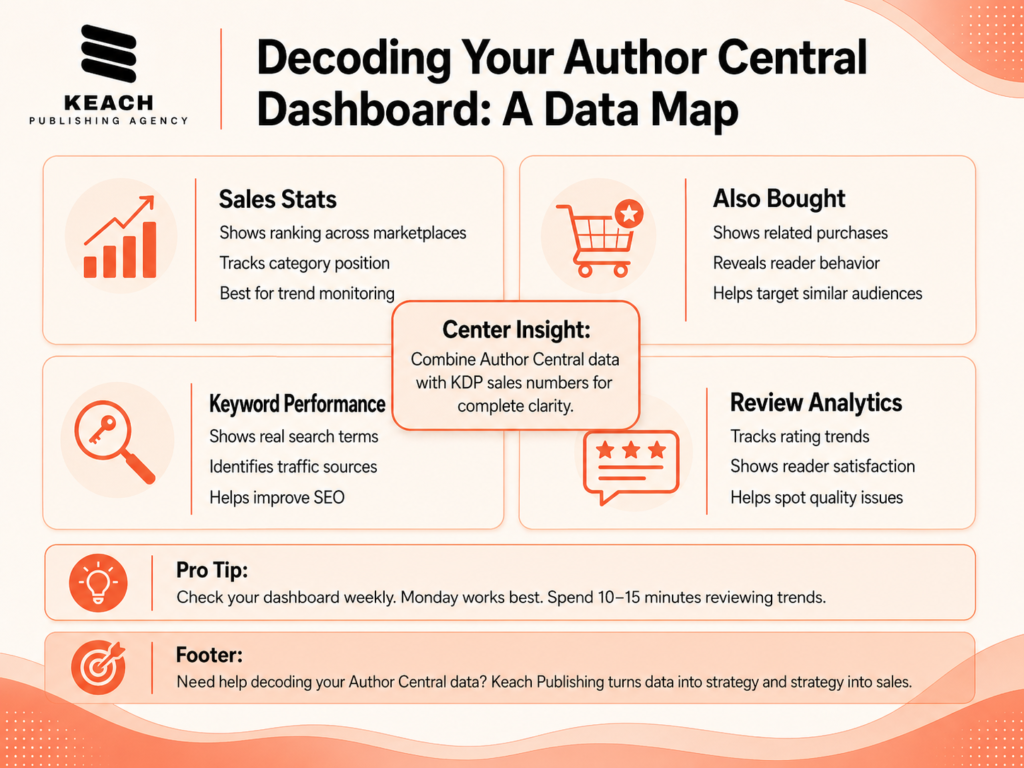
Amazon Author Central reveals insights that KDP does not show. The Sales Stats section shows your ranking across all Amazon marketplaces. You can see how your book ranks among millions of titles.
The Also Bought section is one of the most useful tools. It shows what customers purchased alongside your book. This helps you understand reader behavior and find similar audiences.
The Keyword Performance report shows search terms that lead readers to your book. These are real customer search queries, not guesses. You can use this data to improve keywords and ads. Author Central also includes review analytics. You can track your average rating over time and spot changes early.
How Do You Track Kindle Sales Through Author Central?
Tracking “amazon author central have a kindle sale” is often misunderstood. Author Central does not show direct Kindle sales. That data lives in your KDP dashboard. What Author Central does show is context.
The Sales Stats section highlights category rankings. When rankings shift, it usually reflects sales activity or visibility changes. Your Also Bought section also changes over time. New book connections appear as your audience grows. Old patterns fade. These shifts help you understand how Amazon groups your book with others.
If you are building deeper insight into Amazon’s system, our previous guide Inside the Amazon KDP Interface explains how your publishing dashboard works. Author Central adds the missing context behind those numbers.
Keys To Understanding Your Book Sales Keach Publishing
Author Central holds the keys to understanding your book sales. Unlock them.
Keach Publishing provides comprehensive Amazon Author Central data analysis and strategy. We help you decode your sales data and turn insights into action. Get data help today
What Does “Amazon Author Central How to Get Actual Sales Numbers” Mean?
Many authors search for exact sales numbers inside Author Central. But Author Central does not provide exact unit sales. Instead, it shows rankings and relative performance. KDP gives exact sales numbers. Author Central shows how your book performs in the market compared to others.
When used together, both tools give a complete picture:
- KDP shows exact sales
- Author Central shows performance context
This helps you avoid misreading small changes in ranking or visibility.
How Can You Use Author Central Data to Sell More Books?
Author Central data can directly improve your sales strategy. Start with Also Bought data. Identify books that consistently appear with yours. Study them closely. Look at their covers, descriptions, and pricing.
Next, check Keyword Performance. Focus on keywords that bring traffic but have low conversion rates. Improve your book description to fix this gap. Remove irrelevant keywords that bring no traffic.
Then review category rankings. Some categories are easier to rank in than others. Use this insight when publishing new books. Finally, track review trends monthly. A steady decline may point to quality or expectation issues. A steady rise shows strong reader satisfaction.
Keach Publishing offers complete sales data analysis and marketing strategy.
Turn Insights Into SalesWhat Common Data Interpretation Mistakes Should You Avoid?
Many authors misread Author Central data. The biggest mistake is focusing on daily ranking changes. Rankings shift constantly. Look at weekly or monthly trends instead. Another mistake is ignoring seasonal effects. Sales often dip during holidays or summer. Compare year over year instead of reacting emotionally.
Do not rely too heavily on one “Also Bought” link. One data point does not define your audience. Look for repeated patterns. Finally, do not ignore your dashboard. Checking data weekly helps you catch problems early.
Keach Publishing provides complete sales analytics and strategy support.
Book a consultationWrap Up
Amazon Author Central gives you the story behind your sales.
- Also Bought shows reader connections
- Keyword data shows search behavior
- Rankings show market position
KDP gives numbers. Author Central gives meaning. When combined, you get a full picture of what drives your book performance. At Keach Publishing, we help authors turn this data into action. From keyword strategy to sales analysis, we help you make sense of what your dashboard is really saying.