

You published your book on Amazon KDP. Great. But there is a crucial step that many new authors miss. Claiming your Amazon Author Central page. This free tool gives you control over how you appear to shoppers. It lets you add a bio, photos, videos, and even blog posts. It connects your books under one author profile. And it helps readers discover more of your work.
Without an optimized amazon author central page, you look like every other anonymous author on the platform. With it, you build trust. You establish credibility. You tell readers who you are and why they should care. Let me show you how to claim and master this powerful tool.
Keach Publishing helps authors optimize every part of their Amazon presence.
Let us help you turn browsers into buyers with a professional author profile.What Is Amazon Author Central and Why Does It Matter?
Amazon Author Central is a separate portal from KDP. Think of KDP as the back end where you upload your books. Think of Author Central as the front end where you manage how readers see you.
When you claim your profile, you gain control over your amazon author page. This page appears when shoppers click on your name from any of your book listings. It is your opportunity to make a personal connection.
A complete author page builds trust. Readers are more likely to buy from someone who feels real. Your bio, photo, and author updates humanize you. They turn a name on a screen into a person with a story.
Author Central also provides valuable data. You can see sales rankings, review trends, and which keywords drive traffic. This information helps you make smarter marketing decisions.
How Do You Claim and Set Up Your Author Central Account?
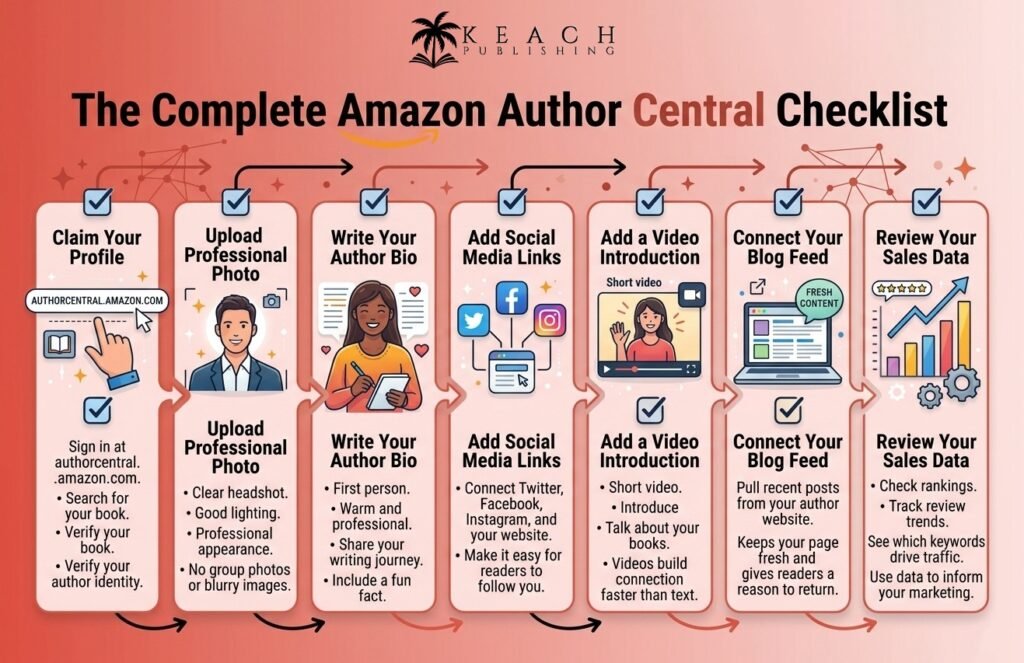
Setting up author central takes about ten minutes. Start by going to authorcentral.amazon.com. Sign in with the same Amazon account you use for KDP. Search for your book. Amazon will match you to your author profile. If you have multiple books, make sure they all appear under your name. Claim your profile by verifying your author identity.
Once inside, upload a professional author photo. A clear headshot works best. Avoid group photos or blurry images. Readers want to see the face behind the book. Write your author bio. Keep it warm and professional. Share why you write. Mention your genre. Include a fun fact or two. Do not just list your credentials. Tell a story.
Add your social media links and website. Author Central allows you to connect your Twitter, Facebook, Instagram, and personal site. These links appear on your author page. If you have been following our series on building your publishing foundation, our previous post on How to Publish a Book on Amazon KDP in 2026 covers the initial upload process. Author Central is the essential next step after publishing.
Keach Publishing: Your Go-To Option
Claimed your author page, but not sure how to make it work for you? Keach Publishing offers Amazon optimization services, including Author Central setup. We help you create a professional author presence that builds trust and drives sales. Let us turn your author page into a powerful marketing tool.
What Should You Include on Your Amazon Author Page?
Your Amazon author page has several sections. Use each one strategically. Your bio is the centerpiece. Write in first person. “I write mystery novels set in small towns” feels more personal than “Jane Doe writes mystery novels.” Share something memorable. A quirky habit. An unexpected career detour. A formative reading experience.
Your photos and videos add visual interest. Upload two or three professional shots. Consider adding a short video introducing yourself. Videos build connections faster than text alone. Your blog feed can pull content from your author website.
Amazon displays your recent posts directly on your author page. This keeps your page fresh and gives shoppers a reason to return. Your “From the Author” section lets you add a personal message. Use this space to thank readers, announce upcoming releases, or share what you are working on next.
How to Sell Books on Amazon Using Author Central
Learning how to sell books on amazon includes mastering Author Central. This tool gives you specific advantages. The “Also Bought” data shows you which books customers purchase alongside yours. Use this information to refine your marketing. If readers of certain authors also buy your books, target those authors’ audiences with ads.
Your author page can feature a series page. If you write a series, Amazon can group your books automatically. This makes it easy for readers to find book one, then book two, then book three. Author Central allows you to report errors. If your book is missing a cover or mis-categorized, you can submit corrections directly. Fixing these issues improves your discoverability.
The sales dashboard provides ranking information. See how your books perform compared to others in your categories. Spot trends. Adjust your marketing accordingly.
Keach Publishing provides book marketing guidance that turns insights into action.
Let us help you read the numbers and make moves that boost your sales.Common Author Central Mistakes to Avoid
Even authors who claim their pages make mistakes. Avoid these pitfalls. Leaving your page incomplete. A claimed page with no bio, no photo, and no links looks worse than no page at all. Finish the setup. It takes ten minutes.
Using an unprofessional photo. Your cousin’s wedding snapshot is not the right image. Invest in a clear, well-lit headshot. It signals professionalism. Ignoring your page after setup. Author Central allows you to add updates, blog posts, and event information. A static page feels abandoned. Refresh it regularly.
Forgetting to claim all your books. If you publish under multiple pen names, each needs its own profile. Search for every variation of your name.
Keach Publishing offers complete Amazon optimization, including Author Central mastery.
Let us help you build an author presence that sells books while you sleep.Wrap Up
Amazon Author Central is a free, powerful tool that too many authors ignore. Claiming your page takes minutes. The benefits last for the life of your books. A complete author page builds trust. Trust leads to sales. Sales build a career.
Start today. Go to authorcentral.amazon.com. Claim your profile. Add a photo. Write your bio. Connect your social media. Check back monthly to refresh your content and review your data.
At Keach Publishing, we help authors master every aspect of Amazon publishing. From KDP setup to Author Central optimization to ongoing marketing strategy, we handle the technical details so you can focus on writing. Your author page is waiting. Let us help you make it work.