
You have a book on Amazon. Maybe it is even selling a few copies. But something is missing. When someone enjoys your book and searches for your name, what do they find? A bare bones Amazon author page? An abandoned social media profile? Or nothing at all?
Here is the hard truth. Every serious author needs a website. Not a fancy, expensive one. Just a clean, functional home base where readers can learn about you, sign up for your newsletter, and buy your books.
Your Amazon listing is a rented space. You follow Amazon’s rules. You play by Amazon’s algorithm. Your author website is different. You own it. You control it. No algorithm can take it away from you.
The best part? A well-designed author website sells books while you sleep. It captures email addresses. It builds your brand. It gives readers a place to land. Let me show you exactly how to build one that works.
Keach Publishing creates professional author websites designed to convert visitors into readers.
Let us handle the tech so you can focus on writing.Why Your Author Website Matters More Than Social Media
Social media feels urgent. You post. You get likes. You watch the numbers go up and down. It is addictive. But here is what scares me about authors who rely too heavily on social media. You do not own any of it.
Instagram changes its algorithm. Your reach plummets overnight. TikTok gets banned in your country. Your audience disappears. Facebook decides your page should show up in fewer feeds. Nothing you can do about it.
Your website is different. You own the domain. You control the content. You decide what visitors see. No algorithm can hide you from your own site.
Think of social media as rented land and your website as the home you own. Always send traffic from social media back to your website. Always capture email addresses on your website. Build an asset that no platform can take from you.
The Essential Pages Every Author Website Needs
A website for writers does not need to be complicated. In fact, the best author websites are surprisingly simple. Here are the essential pages.
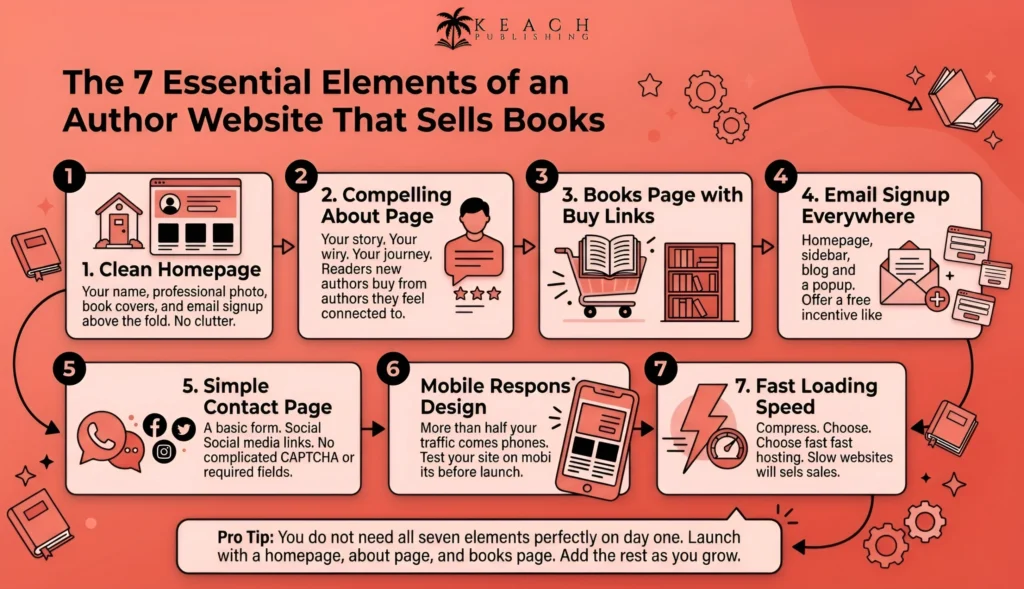
Your homepage is your first impression. It needs to answer three questions immediately. Who are you? What do you write? Where can I buy your book? Put your name front and center. Use a professional author photo. Include clear buttons linking to your books. Keep it clean and uncluttered.
Your about page is where readers connect with you personally. Share your story. Why do you write? What influences your work? What should readers know about you? Include a professional photo. Be real. Readers want to feel a human connection.
Your books page is where you showcase your work. List every title you have published. Include cover images, descriptions, buy links, and reviews. If you have multiple books, organize them by series. Make it easy for readers to find what comes next.
Your email signup form belongs everywhere. On your homepage. In your sidebar. At the end of every blog post. Offer a free incentive. A short story. A sample chapter. A printable bookmark. Something valuable enough that readers will trade their email address for it.
Your contact page needs a simple form where readers can reach out. Also include links to your social media profiles. Make it easy for people to get in touch.
Author Website Design Principles That Work
Author website design does not need to be flashy. In fact, flashy websites often perform worse than simple ones. Here is what actually works.
Mobile responsive design is non-negotiable. More than half of your traffic will come from phones. If your site is hard to read on a small screen, people will leave immediately. Test your site on your own phone before you launch.
Speed matters. A slow website kills sales. Compress your images before uploading. Choose a fast hosting provider. Remove any plugins or widgets you do not actually need. Every second of load time costs you, visitors.
Clean navigation keeps readers on your site. They should never have to hunt for your books page or your email signup. Use clear labels. Books. About. Contact. Nothing clever or mysterious.
Readable fonts are essential. Stick to one or two fonts maximum. Use enough contrast between text and background. Black text on a white background is classic for a reason. Avoid fancy script fonts that are hard to read.
Professional photography builds trust. Your author photo should be high quality. Your book covers should be clear and readable. Avoid stock photos that look fake. Readers can tell.
Author Website Examples: What To Emulate
Looking at author website examples can help you understand what works. Here are the qualities of effective author websites.
Clean and simple wins every time. The best author websites are not cluttered. They have plenty of white space. They guide your eye to the most important elements. The author’s name. The books. The email signup.
Strong visual hierarchy matters. Your name should be the largest text. Book covers should be prominent. Email signup should stand out without being annoying. Everything else is secondary.
Obvious calls to action are essential. Every page should answer the question, what do you want the reader to do next? Buy the book. Sign up for the newsletter. Read a sample. Do not leave them guessing.
Consistent branding creates recognition. Use the same colors, fonts, and style across your website, social media, and book covers. Readers should feel like they are in the same world wherever they encounter you.
Fast loading times keep readers engaged. The best author websites load in under two seconds. If your site takes longer, readers will bounce before they ever see your books.
Author Website Design: Key Elements At A Glance
| Element | Purpose | Best Practice |
|---|---|---|
| Homepage | First impression | Your name, photo, books, and email signup above the fold |
| About Page | Personal connection | Your story, your why, professional photo |
| Books Page | Showcase your work | Covers, descriptions, buy links, reviews |
| Email Signup | Build your list | Offer free incentives, place them everywhere |
| Contact Page | Reader outreach | Simple form, social links |
How To Drive Traffic To Your Author Portfolio Website
An author portfolio website only works if people actually visit it. Here is how to drive traffic.
Link to your website everywhere. In your email signature. On your social media profiles. In the back of your books. At the end of your Amazon description. Every link is a signpost pointing readers home.
Write blog posts that answer reader questions. If you write historical fiction, write about the time period. If you write cookbooks, share recipes. If you write thrillers, share research about unusual settings. Each post is a magnet that can attract new visitors from search engines.
Capture email addresses from every visitor. Use popups, sidebar forms, and end-of-post forms. The more places you ask, the more addresses you collect. Just offer clear value in exchange for the email.
Share your website content on social media. Every blog post is an opportunity to post. Every book update is a reason to share. Drive your social media followers back to your website, where you own the relationship.
Keach Publishing offers author website design that looks professional and sells books.
We handle the setup so you can start connecting with readers.Common Author Website Mistakes To Avoid
I have looked at hundreds of author websites. The same mistakes appear again and again. Avoid these traps.
Hiding your books is the most common mistake. Some authors bury their books behind multiple clicks or obscure menus. Your books should be front and center. One click maximum from your homepage.
No email signup is a disaster. Every visitor who leaves without giving you their email address is a missed opportunity. Make signing up easy and obvious. Offer a free incentive. Do not hide the form.
Outdated content signals abandonment. A website with a copyright date from three years ago looks dead. Update your site regularly. At a minimum, change the copyright year and add a fresh blog post.
Forgetting mobile users costs you, readers. If your site looks broken on a phone, you are losing a huge chunk of your audience. Test thoroughly on multiple devices.
Slow loading times kill sales. Every second of delay increases your bounce rate. Compress images. Choose fast hosting. Remove unnecessary plugins.
Keach Publishing creates professional author portfolio websites designed to sell books.
Let us help you build a home base.Wrap Up
Your author website is not an expense. It is an investment in your career. It is the one piece of your author platform that you fully own. No algorithm changes. No platform shutdowns. Just you, your books, and your readers.
Start simple. A clean homepage. An about page that tells your story. A books page that showcases your work. An email signup form everywhere. Then build from there. Add a blog. Add direct sales. Add media mentions. Your website grows as your career grows.
The best time to build your author website was five years ago. The second-best time is today.
At Keach Publishing, we help authors build professional websites that look great and actually sell books. We handle the technical setup, the design, and the integration with email marketing and ecommerce. You focus on what you do best. Writing and connecting with readers.
Your readers are out there searching for you. Give them a place to land.