
You have written a book. Congratulations. That alone puts you ahead of most people who only dream about becoming an author. Now comes the next step. Getting that book into the hands of readers.
Amazon KDP is the most accessible path for new authors. Kindle Direct Publishing changed the game when it launched. It gave writers the power to publish without gatekeepers. No query letters. No rejection slips. Just you and your manuscript.
This guide will walk you through every step. No jargon. No confusing technical details. Just clear, actionable instructions to help you publish a book on amazon with confidence.
Keach Publishing Is The Truth
Keach Publishing handles the technical complexities of platform setup, formatting, and launch strategy. You focus on writing. We focus on getting your book live and looking professional.
Let us help you turn your manuscript into a marketplace success.What Is Amazon KDP and Why Should You Use It?
Amazon KDP stands for Kindle Direct Publishing. It is Amazon’s self-publishing platform. You upload your book. They make it available for sale on Amazon stores worldwide. The beauty of amazon kdp publishing is accessibility. You do not need an agent. You do not need a publisher. You just need a manuscript and a few hours to set everything up. Millions of authors have used KDP to reach readers.
KDP handles the technical side. File conversion. Distribution. Download delivery. Royalty payments. You focus on writing and marketing. Amazon handles the rest. For beginners, KDP is the ideal starting point. The interface is user-friendly. The support documentation is extensive. The community of authors is large and helpful. You can literally go from manuscript to marketplace in a weekend.
How Do You Prepare Your Manuscript for KDP?
Before you even log into KDP, your manuscript needs to be ready. “Ready” means more than just finishing the last chapter. Professional editing is non-negotiable. Typos and grammatical errors frustrate readers. They leave bad reviews. Bad reviews kill sales. Hire a professional editor. It is an investment that pays for itself.
Formatting matters too. A clean interior looks professional. It signals that you took your work seriously. You can format your manuscript yourself using Word or Google Docs. But many authors hire a professional formatter to ensure perfection.
Your cover is the first thing shoppers see. On Amazon, they see it as a tiny thumbnail. If your cover does not pop at that size, readers scroll past. Invest in professional cover design. It is not an expense. It is a marketing asset that works for you 24 hours a day. Once your manuscript is edited and formatted, you are ready to publish on KDP.
A Step-by-Step Guide to Self-Publishing a Book on KDP
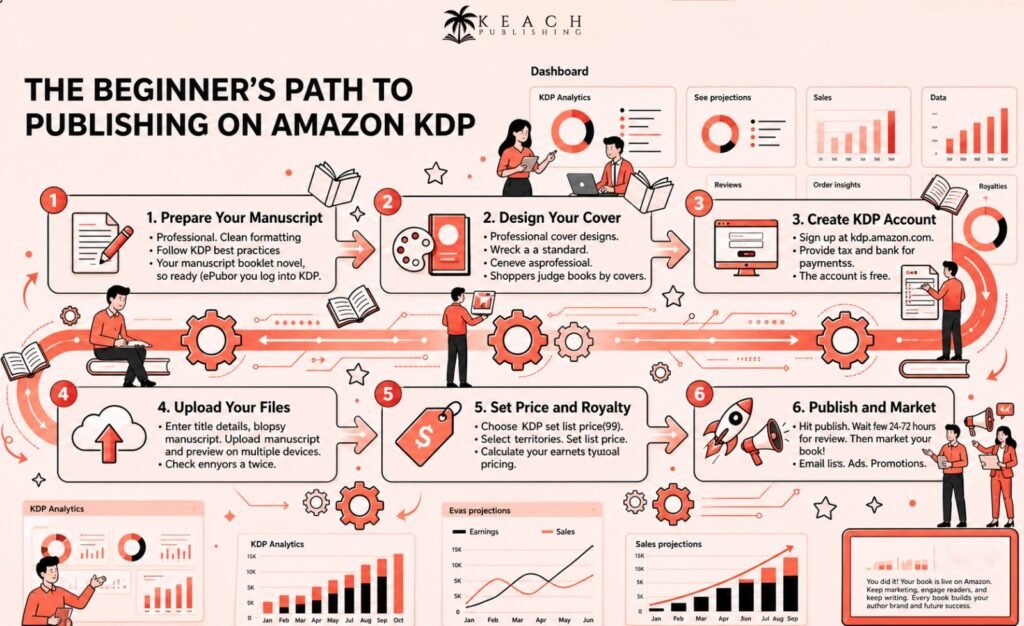
Step one is creating your KDP account. Go to kdp.amazon.com. Sign in with your Amazon account or create a new one. You will need to provide tax information and bank details for royalty payments. This takes about fifteen minutes.
Step two is adding a new title. Click the “Create a new title” button. Choose between Kindle ebook, paperback, or hardcover. Most new authors start with an ebook and add a paperback later. Both use the same manuscript with different formatting specifications.
Step three is entering your book details. Title. Subtitle. Author name. Series information. Edition number. Be accurate. These fields feed Amazon’s catalog. Mistakes are harder to fix after publication.
Step four is uploading your manuscript and cover. KDP accepts Word documents, PDFs, and EPUB files for manuscripts. For covers, upload a high-resolution JPEG or TIFF. KDP’s cover creator is available if you do not have a professional cover, but a custom design is always better.
Step five is setting your price and royalty. Choose between 35 percent and 70 percent royalty options. The 70 percent option requires pricing between certain ranges. Select the territories where you want to sell. Most authors choose all territories.
Step six is publishing. Hit the “Publish” button. Amazon reviews your files. This usually takes 24 to 72 hours. Once approved, your book goes live. Congratulations. You have successfully learned how to publish a book on amazon kdp.
What Should You Know About KDP Pricing and Royalties?
Understanding royalties is essential. This is how you get paid. KDP offers two royalty options for ebooks. The 70 percent royalty option applies to ebooks priced in certain ranges. It is available in major markets like the US, UK, Germany, and others. A delivery fee applies based on your file size. Smaller files mean lower fees.
The 35 percent royalty option applies to ebooks outside those price ranges. It also applies to sales in certain international markets. There is no delivery fee, but the lower percentage means you keep less per sale.
Paperbacks use a different calculation. Amazon prints your book on demand. Your royalty is your list price minus printing costs. Longer books cost more to print. Shorter books cost less. Price accordingly. You can change your prices at any time. Experiment. See what works for your genre and audience. There is no penalty for adjusting.
How Do You Optimize Your Book Listing for Discovery?
Publishing is half the battle. The other half is getting found. Optimization helps readers discover your book. Your title and subtitle carry the most weight in Amazon’s search algorithm. Include relevant keywords naturally. But keep it readable. A title that looks like spam will turn shoppers away.
Your book description is your sales pitch. The first two lines matter most because they appear in search results. Hook the reader immediately. Make them want to click “Read more.” Backend keywords are fields that Amazon provides for search terms. Use all seven slots. Think like a reader. What phrases would someone type to find a book like yours? Use specific phrases, not single words.
Categories help readers browse to your book. Choose the most specific categories available. A specific category like “Cozy Mystery” is better than a broad category like “Mystery.” If you have been following our series on building a sustainable career, our previous post on How to Scale Your Author Career covers the sales analytics and marketing strategies that come after publication. Publishing is the beginning, not the end.
Keach Publishing provides amazon kdp publishing setup and optimization services.
We help you avoid beginner mistakes and get your book live the right way.What Happens After You Publish?
Your book is live. Now the real work begins. Marketing is how readers find you. Do not rely on luck. Set up your Author Central account. This is separate from KDP. It lets you manage your author profile, add biography information, and track sales data. Claim your author page as soon as your book is live.
Encourage reviews. Ask friends, family, and early readers to leave honest reviews. Reviews build social proof. They convince other shoppers to take a chance on your book. Consider enrolling in KDP Select. This program makes your ebook exclusive to Amazon in exchange for promotional tools. Kindle Countdown Deals and Free Book Promotions can generate visibility. You also earn royalties from Kindle Unlimited page reads.
Start writing your next book. The most successful authors build backlists. Each new book breathes life into your older titles. A reader who discovers you through book three will often go back and buy books one and two.
What Common Mistakes Should Beginners Avoid?
Even smart beginners make mistakes. Here are the most common ones to avoid. Skipping professional editing. You cannot edit your own work effectively. You are too close to it. Hire an editor. Your reviews will thank you.
Using a DIY cover. Your cover is your first impression. A bad cover screams amateur. Invest in professional design. Ignoring keywords. Amazon is a search engine. Keywords determine whether readers find you. Fill all seven fields with specific phrases.
Publishing without a plan. Marketing starts before publication. Build your email list. Gather advance reviews. Schedule promotions. Do not hit publish and hope. Forgetting about your backlist. Your older books are still for sale. Link to them in your new releases. Run ads for book one in a series. Your backlist is free money.
Keach Publishing offers complete publishing support from manuscript to marketplace.
Let us help you navigate KDP so your book launches with confidence.Wrap Up
Publishing your first book on Amazon KDP is exciting. It is also detailed. There are many steps. But each step is manageable. Take them one at a time. You will get there. Start with professional editing and cover design. Prepare your manuscript carefully. Follow the KDP upload process step by step. Optimize your listing for discovery. Then market your book consistently.
The authors who succeed are not the ones who publish one book and hope. They are the ones who treat publishing as a process. They learn. They improve. They publish again.
At Keach Publishing, we help authors navigate every stage of self-publishing. From manuscript preparation to platform setup to launch strategy, we handle the technical complexities so you can focus on writing. Your book deserves to be read. Let us help you make that happen.